Overview
In modern desktop computing, the push toward slim, minimalist laptops has left many professionals grappling with a shortage of physical connectivity. Whether you operate a high-end Apple MacBook Pro, a Windows ultraportable, or a mobile workstation, connecting external displays, high-speed storage arrays, audio gear, and wired networking often turns your desk into a tangled web of separate dongles and single-purpose adapters. The CalDigit TS4 Thunderbolt 4 Dock aims to eliminate this frustration by serving as a comprehensive command center, delivering a staggering 18 functional ports over a single high-bandwidth connection.
Positioned as the flagship successor to CalDigit's popular TS3 Plus, the TS4 transitions from Thunderbolt 3 to Intel's Thunderbolt 4 architecture, expanding peripheral flexibility and integrating modern hardware standards such as 2.5 Gigabit Ethernet, dual UHS-II card readers, and up to 98 watts of laptop host power delivery. Based on comprehensive analysis of technical specifications, expert benchmark measurements, and feedback from verified workstation owners, this review examines how the CalDigit TS4 performs under demanding real-world workloads, where it excels, and whether its premium price tag is justified for your workflow.
Design and Build
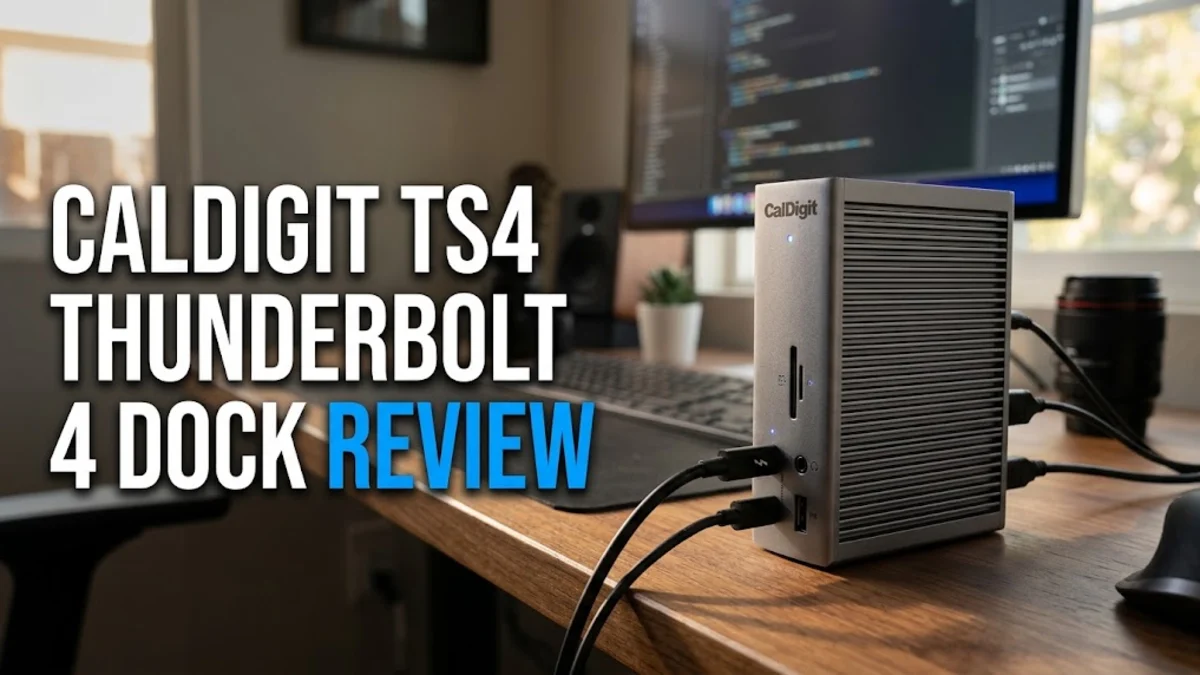
CalDigit maintains its signature industrial design language with the TS4. The dock features a heavy extruded aluminum chassis finished in matte space gray, with deep vertical ridges along its sides that serve both a structural and functional purpose. Rather than relying on an internal active cooling fan that could introduce noise over time, the solid metal housing acts as a passive heat sink to dissipate thermal energy during intensive file transfers or maximum-wattage charging cycles.
Measuring 7.87 by 2.87 by 4.46 inches and weighing 1.41 pounds, the TS4 feels remarkably solid on a desk and will not slide around when plugging in rigid or heavy cables. Orientation flexibility is a key design highlight: you can stand the TS4 vertically to minimize its desktop footprint, or lay it flat horizontally using the two included rubber friction strips that slide neatly into the side ridges to prevent surface scratching.
Port layout is logical and tailored for clean cable management. High-frequency removable connections—such as quick-access USB-C, USB-A, SD and microSD card slots, and an audio combo jack—are positioned on the front panel for instant accessibility. Static long-term connections, including video outputs, main host connectivity, dedicated audio line input and output, downstream Thunderbolt 4 ports, power input, and Ethernet, are routed to the rear panel. Users should keep in mind the external power supply: the TS4 relies on a substantial 230-watt power brick that is nearly as large as the dock itself, requiring dedicated space beneath a desk or in a cable management tray.
Key Features and Performance
The defining strength of the CalDigit TS4 is its broad array of 18 total ports, making it the most well-connected Thunderbolt 4 dock currently available. Powered by Intel's Goshen Ridge Thunderbolt 4 controller, the TS4 provides 40 Gbps of shared bi-directional bandwidth. The main upstream connection to your host laptop supplies up to 98 watts of Power Delivery, which is plenty of energy to fast-charge a 14-inch MacBook Pro or efficiently power a 16-inch MacBook Pro, Dell XPS 15, or Lenovo ThinkPad under heavy computational stress.
For video output, the TS4 features one dedicated DisplayPort 1.4 connection alongside two downstream Thunderbolt 4 ports capable of carrying native DisplayPort signals. On Windows PCs equipped with Thunderbolt 4 or Macs with Apple M-series Pro, Max, or Ultra processors, the dock can drive a single external monitor up to 8K resolution at 60Hz or dual 4K monitors at 60Hz. It is important to note hardware architecture limits: base Apple Silicon M1, M2, and M3 chips natively support only one external display over Thunderbolt. Independent reviewer testing confirms stable video handshaking, crisp color output, and zero display latency across supported multi-monitor configurations.
Peripheral data performance across the dock's USB interfaces is outstanding. The TS4 includes three USB-C ports and five USB-A ports, all operating at USB 3.2 Gen 2 speeds up to 10 Gbps. Verified tests demonstrate that external NVMe portable SSDs connected to these ports consistently reach speeds exceeding 900 MB/s. Furthermore, the front-facing USB-C port provides up to 20 watts of Power Delivery, enabling fast charging for smartphones and tablets even when the host laptop is disconnected or turned off.
Photographers and videographers will appreciate the dual front-facing SD 4.0 and microSD 4.0 card readers. Operating on independent internal buses, both slots can be used simultaneously to offload photos and high-bitrate video footage at speeds above 300 MB/s when using UHS-II memory cards. Network performance gets a forward-looking upgrade with a 2.5 Gigabit Ethernet port, doubling the potential throughput of standard 1GbE docks when connected to multi-gigabit switches or high-speed network-attached storage (NAS).
Audio options are equally versatile, featuring three distinct audio interfaces: a front 3.5mm combo jack for headsets, a rear 3.5mm audio output for desktop monitors, and a rear 3.5mm audio input for dedicated microphones. macOS and Windows recognize these as discrete audio channels, allowing seamless audio routing without physical cable swapping.
Who It Is For (and Who Should Skip It)
The CalDigit TS4 is built for creative professionals, software developers, engineers, and power users who demand desktop-level connectivity from a single laptop connection. If you return to a multi-monitor desk setup every day and need fast memory card ingestion, multi-gigabit local networking, and heavy peripheral expandability, the TS4 offers an unmatched single-cable docking solution that streamlines your entire workspace.
Conversely, casual users with basic connectivity needs should skip the TS4. If your workflow requires only a single external monitor, a keyboard, and an occasional USB flash drive, a standard USB-C hub costing under $80 will suffice without requiring a large power brick or a $400 investment. Frequent travelers looking for a lightweight travel hub will also find the TS4 too heavy and dependent on wall power. Finally, owners of base-model M1, M2, or M3 MacBooks seeking dual-monitor setups without software workaround dongles should note that native hardware limitations restrict them to a single display output.
Alternatives Worth Considering
While the TS4 holds a dominant position in feature count, several compelling alternatives exist depending on your specific needs and budget. The Kensington SD5700T Thunderbolt 4 Dock is a popular alternative that provides four total Thunderbolt 4 ports (one host, three downstream) and four USB-A ports. It offers 90 watts of power delivery and reliable dual-monitor support, though it lacks 2.5Gb Ethernet, a microSD slot, and the extensive port variety found on the TS4.
The OWC Thunderbolt 4 Dock is another solid competitor, offering three downstream Thunderbolt 4 ports, four USB-A ports, an SD card reader, and 96 watts of host power charging. It comes in a slightly more compact footprint and is often priced lower than the TS4, making it a great option if you prioritize extra Thunderbolt downstream ports over legacy USB-A ports and dedicated audio inputs.
For users who want a sleek design matching Apple aluminum hardware, the Satechi Thunderbolt 4 Multi-Display Dock offers premium build quality and straightforward video connectivity, though its total selection of 11 ports is considerably smaller than CalDigit's 18-port array.
Final Verdict
The CalDigit TS4 Thunderbolt 4 Dock sets the standard for desktop docking performance. By combining 18 versatile ports, 98 watts of host power delivery, 2.5Gb Ethernet, dual UHS-II card readers, and passive thermal cooling inside an exceptionally durable aluminum chassis, it solves practically every connectivity challenge a modern mobile workstation user faces. Although its price is high and its external power brick requires thoughtful desktop placement, its performance and build quality make the TS4 a top-tier investment for serious productivity setups.