Overview
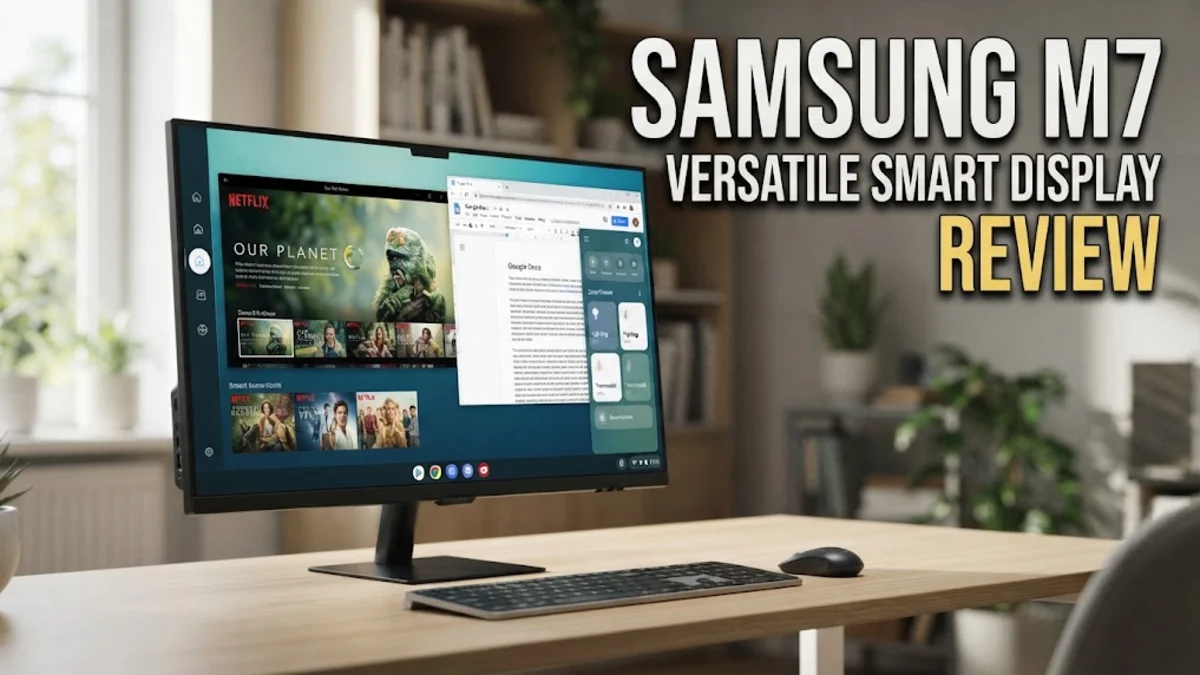
In the evolving landscape of home office technology, the Samsung M7 monitor stands out as a category-defying device. Most monitors are passive input devices designed to show whatever the connected machine tells them to; the M7, however, is a smart display with its own brain. Powered by Samsung's Tizen operating system, it behaves remarkably like a smart television. For a professional or a student working in a limited space—such as an apartment or a dorm room—this monitor offers a clever solution to the problem of screen real estate. It allows you to ditch the dedicated TV and consolidate your media and computing needs into one high-resolution panel.
By integrating Wi-Fi connectivity, app support, and remote desktop functionality, the M7 is less about raw technical specs and more about convenience. It aims to solve the problem of clutter and input-switching friction. When you are done with a spreadsheet, you can hit a button on the remote to launch your preferred streaming service or cloud-based game, turning your workstation into an entertainment center in seconds. It represents a shift toward more integrated home hardware, appealing to those who want a workspace that can double as a relaxation station with minimal technical overhead.
Design and Build
The design philosophy here is decidedly contemporary. Samsung has opted for a minimalist aesthetic that prioritizes clean lines and thin bezels, which creates an immersive viewing experience. The chassis is slim and lightweight enough for easy setup, yet it maintains a sturdy footprint on standard desks. While the build is primarily plastic, it features a finish that resists smudges and feels reasonably premium for its price point. The monitor’s physical presence is subtle; it does not draw unnecessary attention to itself, allowing it to fit into both high-end studio setups and casual home corners.
However, the build quality involves certain compromises. The stand, while functional, lacks the extensive articulation found on dedicated professional-grade monitors. You have basic tilt control, but you are limited in terms of height adjustment and swivel capabilities. For users who prioritize ergonomic perfection, this is a significant trade-off. Many owners find themselves investing in a third-party VESA mount arm to gain the vertical and horizontal freedom required for long hours of comfortable viewing. The I/O panel is thoughtfully designed with a hidden cable management channel, which helps maintain that clean aesthetic by routing cables neatly behind the base, an essential feature for a workspace that needs to look tidy on camera during video calls.
Key Features and Performance
The standout feature of the M7 is undeniably its 4K UHD resolution. At 3840 x 2160, the pixel density is high enough to make text extremely sharp, which is critical for those who spend their entire day reading emails, writing reports, or analyzing data. Color reproduction is handled by a VA panel, which provides decent contrast ratios that make dark scenes in movies look deeper than they would on a standard IPS panel, though it lacks the wide viewing angles found on more expensive IPS professional displays. In practice, this means that for solo work, the image is vibrant and punchy, but color shift may occur if you are viewing the screen from a sharp angle.
The Tizen operating system is where this monitor truly separates itself from the competition. It comes pre-loaded with major streaming platforms like Netflix, YouTube, and Amazon Prime. Unlike a standard monitor, you can boot these up independently of any PC connection. Furthermore, the remote desktop access is a genuinely useful feature. If you have a PC or Mac elsewhere, you can link it wirelessly. For tasks like checking in on a server, light administrative work, or accessing documents remotely, this functionality is a game-changer. The monitor also includes Samsung DeX support for compatible mobile devices, turning your smartphone into a desktop interface on the big screen, which is ideal for quick edits or showing media.
Connectivity is another highlight. The inclusion of a USB-C port that supports power delivery means you can connect your laptop with a single cable, transferring video signal and charging the device simultaneously. This effectively reduces your desk setup to a single cable solution, which is the gold standard for a clean home office. The overall responsiveness of the UI is snappy, though heavy users may notice a slight lag if multiple apps are running in the background simultaneously.
Who It Is For (and Who Should Skip It)
This monitor is tailor-made for the hybrid professional and the student. If you operate in a small room where a separate TV is not feasible, the M7 gives you the best of both worlds. It is also perfect for minimalist enthusiasts who want to keep their cable count low and their desk surface clear of unnecessary clutter. The integration of streaming apps and remote desktop capabilities makes it an incredible "second home" setup for people who work from different locations but want a familiar, consistent display experience.
Conversely, some users should look elsewhere. If your professional life revolves around color-accurate design, photo editing, or professional video production, the M7 will likely frustrate you. Its color gamut, while good for media, does not meet the standards of color-critical work. Gamers, particularly those who play fast-paced competitive shooters, should also note that the refresh rate and response times are tuned for productivity and movies, not high-speed frame rates. If you prioritize low input lag and high frame rates, you would be better served by a dedicated gaming monitor with higher refresh rates.
Alternatives Worth Considering
When shopping for this type of display, the landscape is competitive. The Dell S2722QC is a classic, traditional choice for those who want a reliable IPS panel that prioritizes ergonomics and connectivity over smart features. It offers a more adjustable stand out of the box and generally superior color accuracy, making it a better choice for someone who never intends to use their monitor as a TV. Then there is the Samsung M8, which is the M7's big brother. It features a sleeker, more "designer" look, a built-in webcam for video conferencing, and a slightly more refined panel. It is a step up in price, but for those who value the M7's smart ecosystem and want a more premium build, the M8 is a compelling upgrade. Finally, the LG 27UP650-W is worth looking at if you want a display that excels at picture quality and brightness, specifically for content creation, even if it lacks the Tizen OS smart interface entirely.
Final Verdict
The Samsung M7 is a masterclass in adding value through software. It proves that a monitor can be more than just a piece of glass; it can be an active member of your home office infrastructure. While it is not going to satisfy the needs of high-end creative professionals or competitive gamers, it hits a "sweet spot" for the vast majority of regular home office users. By combining high-resolution performance, versatile smart features, and modern connectivity options like USB-C power delivery, it simplifies the desk setup in a way few other products can. For the price, it is an incredibly convenient, well-rounded, and clever addition to any modern workspace.