Overview
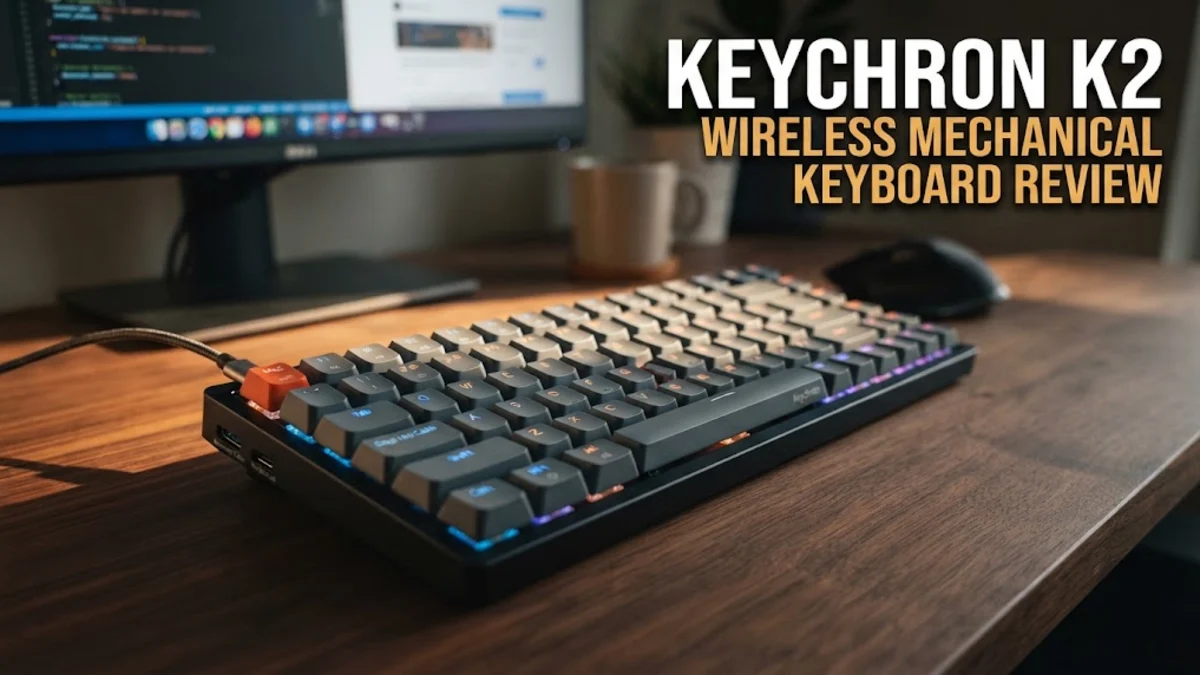
The Keychron K2 wireless mechanical keyboard has established itself as an enduring staple in the mechanical keyboard community since its initial introduction. Known for balancing compactness with dedicated function keys and arrow keys, the 75 percent layout offers a practical footprint for crowded desks without sacrificing the navigation tools many professionals rely on daily. Research into manufacturer specifications and expert consensus shows that this board bridges the gap between casual desktop setups and mobile productivity, fitting comfortably into backpacks as easily as it anchors a home office desk.
As a wireless mechanical keyboard that supports both macOS and Windows out of the box, it appeals heavily to multi-platform users who might use a MacBook for work and a Windows desktop for personal tasks or gaming. You get physical switch toggles located conveniently on the side of the chassis to change operating systems, alongside dedicated keycaps for both environments in the box. Whether you choose to connect via Bluetooth 5.1 for untethered movement or plug in with the included USB-C cable for zero-latency performance, the Keychron K2 aims to deliver reliable multi-device connectivity across laptops, tablets, and desktop computers.
Design and Build Quality
When you examine the physical construction of the Keychron K2, you will notice a sturdy plastic frame with an optional aluminum bezel version for extra rigidity and a more premium aesthetic. The chassis feels remarkably robust, minimizing flex even when you type with heavy force or during intense gaming sessions. Weighing in at around 794 grams for the aluminum frame variant, it has enough heft to stay securely anchored on your desk without sliding around during rapid keystrokes, yet it remains light enough to transport if you prefer working from coffee shops or shared office spaces.
One design aspect that requires careful consideration is the front height of the keyboard. Mechanical keyboards of this style and profile often feature a relatively high-angle chassis. Without a matching wrist rest, your wrists might experience fatigue during extended typing or gaming marathons. The keycaps sit high above the desk surface, which is standard for keyboards using traditional mechanical switches, but it is worth noting if you are transitioning directly from a slim laptop keyboard or a low-profile membrane board.
Key Features and Performance
Performance centers heavily on your choice of mechanical switches. You can typically find the Keychron K2 equipped with Gateron mechanical switches in Red, Blue, or Brown variants, or Keychron's own proprietary hot-swappable optical or mechanical switches. Brown switches offer a tactile bump without an audible click, making them exceptionally popular for office environments where loud typing might disturb coworkers. Red switches provide a smooth, linear feel favored by gamers who need quick, uninterrupted double-taps, while Blue switches deliver a loud, satisfying click and tactile resistance that traditional typists adore.
Bluetooth 5.1 technology allows you to pair up to three different devices simultaneously and switch between them using simple, intuitive keyboard shortcuts. The transition between a work laptop, a personal tablet, and a desktop machine is seamless in everyday use, eliminating the clutter of multiple keyboards or constant re-pairing. When it comes to battery life, the built-in 4000mAh rechargeable lithium-ion battery delivers up to 72 hours of continuous typing with the backlight turned off, or around a week with normal daily use and backlighting enabled.
Backlighting comes in two main flavors depending on the specific model you purchase: simple white LED or vibrant RGB with numerous customizable lighting effects. The illumination is bright and evenly distributed across the board, though shine-through keycaps are not always standard on base models, meaning the light mostly diffuses gorgeously around the edges of the keycaps rather than glowing directly through the letter legends.
Who It Is For (and Who Should Skip It)
This keyboard is ideally suited for remote workers, programmers, writers, and casual gamers who want a compact mechanical keyboard that works effortlessly across Mac and Windows operating systems. If you frequently switch between an office laptop at your desk and a tablet on your kitchen counter, the multi-device pairing feature saves considerable time and mental friction throughout your workday.
You should skip this keyboard if you prefer an ultra-thin, low-profile typing experience akin to a modern Apple Magic Keyboard or the Logitech MX series. Additionally, competitive esports gamers who demand absolute zero latency via a dedicated 2.4GHz wireless USB dongle might find Bluetooth slightly less responsive for twitch-reaction competitive gaming, though plugging in the included USB-C cable immediately resolves any latency concerns.
Alternatives Worth Considering
If you are exploring the market for 75 percent keyboards, several competitors offer similar feature sets that might better match your specific preferences:
- NuPhy Halo75: Offers a lower physical profile, premium acoustic sound damping, and vibrant RGB aesthetics at a slightly higher price point, appealing to enthusiasts who prioritize sound profiles.
- Logitech MX Mechanical Mini: Features low-profile mechanical switches and a sleek, understated design tailored strictly for productivity and office work without the high-angle wrist strain.
- Epomaker EP84: A budget-friendly alternative that provides great out-of-the-box customizability and hot-swappable PCB support for users who love tinkering with different switches and keycaps.
Final Verdict
The Keychron K2 wireless mechanical keyboard remains a deeply compelling choice for anyone seeking a reliable, versatile, and well-built typing tool. Its thoughtful combination of Mac and Windows hardware compatibility, solid wireless performance, and multiple mechanical switch configurations makes it a dependable daily driver for a wide variety of users. While the tall profile does require a separate wrist rest for optimal ergonomic comfort during long sessions, the overall value proposition, build quality, and typing satisfaction are difficult to surpass in this price category.